

We have created the standard Canadian Tax rules 2014 for WooCommerce. No more headaches, just download, import and you’re done.
Download here: canadian_tax_rates
**UPDATE: Looking for the 2015 Canada Tax download? Find it right: https://staging23.presshero.co/woocommerce-2015-canadian-tax-import-download/**
We’re here to make running WooCommerce easy.
To use the Canadian Tax rules, begin by logging into your WordPress installation.
-
Click WooCommerce – Settings

-
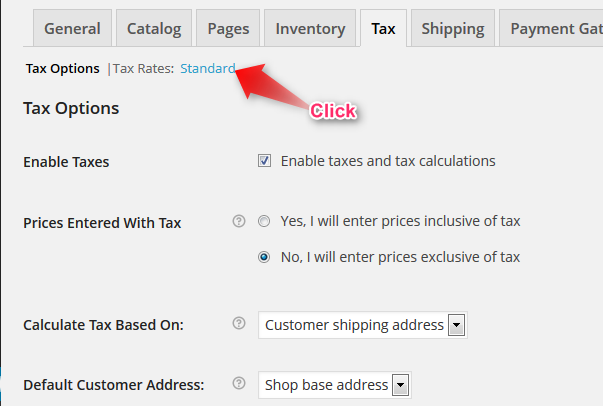
Click the “Tax” tab

-
Click the “Tax Rates” options “Standard”
-
Click “Import CSV” – browse your computer and upload the Canadian Tax Rates

-
Click “Save Changes”
Note: to update single tax rates or to remove them you can edit directly. Choose the rate you would like to modify and type the new value – the modification will happen in real time without page refresh. Click save to make the changes permanent.
Happy Selling!
**UPDATE: Looking for the 2015 Canada Tax download? Find it right: https://staging23.presshero.co/woocommerce-2015-canadian-tax-import-download/**